Nuke 7.0v1

When the first beta of Nuke 7 was available I was excited to have a look. I was hoping for some very basic fixes. I have never liked the tracker. The tracker in Nuke has always felt half baked. The RotoPaint node has huge problems. If it weren't for paint being universally horrible in compositing packages, the foundry would field a huge amount of support email.

The Foundry has done a lot to address these very problems.

The tracker really seems to be reworked. Even the math the tracks use to find the pixels from the last frame seems different. The one feature that is really great is how most of the controls are in the viewer now. You dont have to float the properties panel over the viewer. Shake had a tracker that did this and this makes tracking so much easier when there was a lot of tracking to do. You can have as many trackers as you want, adding them til you have your whole scene tracked. A really great feature. You can average tracks as well which is really handy if you have high frequency jitter in a plate. You can also start your track by hand, tracking the points you need. Then have Nuke track within those key frames. You then can go thru and fix the sections were there are problems. It's also very handy, and implemented very well. The Foundry has also added the ability to create transforms and cornerpins right from the tracker. No more dragging and making cornerpins. I wont miss doing that at all. The Nuke Tracker is now really good.

Rotopaint is looking better. The RotoPaint feels less buggy. I'll explain. RotoPaint has always felt broken and by using it you were headed down a path that might not have a end. Sure it was fine for painting a quick clean plate or touching up some hair in the few frames for a challenging greenscreen comp. But anymore that you where headed into a world of hurt. To many times I have or someone I know has been burned by the RotoPaint Node. I have watch an artist get up and walk because the only paint we have is Nuke. The best painters I know have always hated the paint in Nuke. It's getting better. The onionskin still doesn't have the option to invert your overlay. A must have for low contrast painting.

Framehold and Timeoffset for the 3D system. I'll say it again "Framehold and Timeoffset for the 3D system".

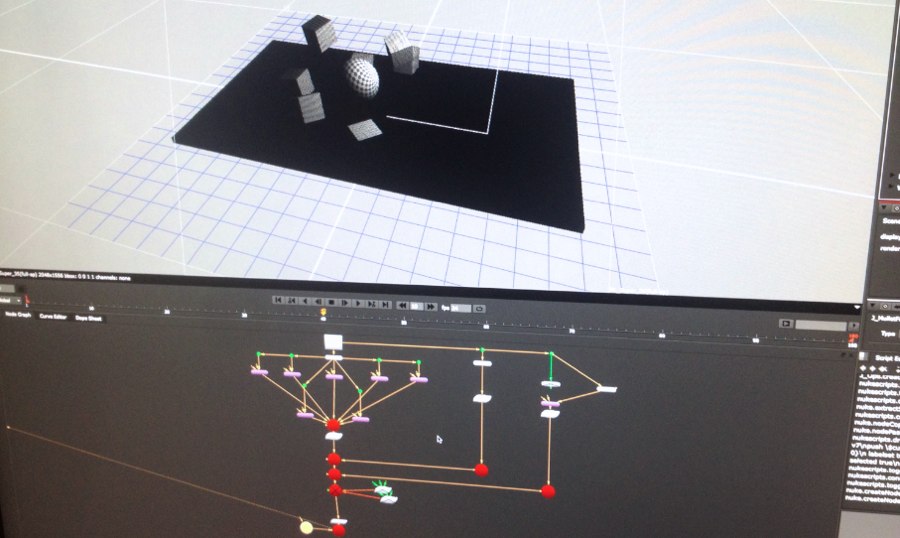
The modeler has been reworked. Building out scenes is quicker, easier and much more fun. The new geo nodes that allow for Extrusion and Bevel are great. I can't wait for Modo to start working its way into Nuke.

Here are some additional links for more information.

The Foundry

Power and Performance

File Formats

I am looking forward to diving more into Nuke 7 and using it in a real world environment.
Manipulating the pupil of an eye

Dumpduck post on forums.thefoundry.co.uk:

Hi, I'm working with footage of an eye and I'm trying to dilate the pupil ever so slightly. The challenge for me is getting the iris to look as it is contracting accordingly. By rendering out a normal shader from Maya (one channel from top to bottom, one from right to left and one with facing ratio) and using it with an IDistort (same method as this guy fakes refraction in Nuke: vimeo.com, I've managed to push the pixels around the pupil. It works to some extent, but doesn't seem like a good way of achieving this.

Good problem solving.

Nuke User Group Meeting with Nuke 7

Via gnomonschool.com:

Join RFX, The Foundry, and Gnomon for the Fall Nuke User Group Meeting and learn about the new features in Nuke 7. This event will include presentations and demos of Nuke 7 from Deke Kincaid of The Foundry, as well as workflow demonstrations from Gnomon’s own Martin Hall. If you’re interested in learning more about the next generation of 2D/3D compositing, this event is not to be missed!

See you there.

7.0

Nuke 7

The Foundry:

Set to be our biggest NUKE release to date, NUKE 7.0 comes with a host of polished and perfected tools to streamline your day-to-day workflow, as well as new additions to complement it's highly acclaimed feature set.

Looking forward to the new roto and paint. Good to see a updated 2d tracker. Basics, I'm liking this. The filters and Kronos will be great on the GPU.

The new 3d system stuff always powerful in the right hands.

Here is a link to the beta

OTS

I had a client over my shoulder all day today. I'd like to share some take aways.

  • Know your script. Don't fumble about.

  • Only make suggestions when you are not getting the feedback you need. Sometimes that jump starts the clients ideas.

  • Never make suggestions that cant be done. No jokes.

  • Stay with what you know.

  • Be ready to translate plain English into a group of nodes.

Last a tip of the hat to all the commercial artists, client based compositors, colorist. It exhausting.

I didn't f%* up.

Never let anyone tell you how to comp. Composite with purpose. Have a reason for everything you do, and the facts to back it up.

Defend your techniques.

If someone doesn't understand, explain yourself in a matter that gets the point across.

Most of what I do, make as many mistakes as I can in the shortest amount of time.

I love my job. Wouldn't change a thing.

Comp

When I'm asked: "What do you do for a living".

I get a lot of blank stares when I respond "Compositor". So most of the time the next job title i try is Visual Effects. I then get "oh ok".

I was an AD[Assistant Director]for awhile as that was the only thing that made sense to my family. Which is a strange idea altogether. I would make a horrible AD. The scary thing is Compositing is even more obscure.

If you search wikkipedia for Compositing, you get a page that gives the basic rundown. Putting the mathematics right on top of the page seems to be a bad idea. Scares people away. Scolldown and you will get into more of the nitty gritty. The main thought to take away from this page is that Compositing is not a new sport.

Compositing [Comp as I will refer to it] at its simpleist is problem solving. Layer A needs to be placed over layer B. Simple right, wrong. Not simple. Theres math, theres color. Most comps start off very simple but very fast turn into a huge web of color values being pushed and pulled to make a cohesive image that makes sense. Most of the time you work either background to foreground. Make sure all elements work based on color, sharpness and. atmosphere Its when you run out of buttons to push is when you have run out how good you are. As a compositor you have no choice but to be successful. You're the last stop. The Maya artists are done and the coordinators are waiting for your render. Make it perfect. Dont laugh I have seen those notes for shots. My mentor has "Make more Magical" come across his desk.

Understand Lenses, color and have ninja powers on your compositing software and all will be good.